PO-UM-001 · Revision 1.7 · 18 October 2026
7.0 Connect Your Scale & Verify Your First Reading
Follow this walkthrough with your physical scale beside you. A selected device, an open relay connection, or a checked box alone does not prove a measurement worked: confirm a fresh weight, its time, and the saved record.
Before you start: open the published Body-PulseX app in its own Chrome tab. Phone QR pairing uses https://body-pulse-intel.shop/relay and requires that website to be published and reachable. The editor preview cannot prove physical Bluetooth pairing. The phone APK has been built, but operation on your actual scale and phone still needs this check.
Step 1 — Start on the Dashboard
- Open Console (the Dashboard) and find Scale in Live.
- Tap Link scale to pair directly. If the button instead says Open in full tab to link, open the new Chrome tab and tap Link scale there. If it says Bluetooth off — check again, turn Bluetooth on in phone settings, return, and tap again.
- If Bluetooth is unavailable, choose Link via phone relay or Set up phone relay. Follow Step 2B below.
- Tap Open Body to see the scale setup, Live capture, and your saved readings. You can also select Body in the navigation; on a phone, use Open Body on the Scale card.
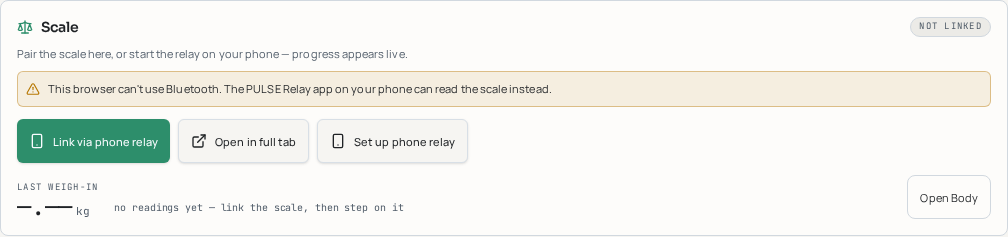
Actual app screenshot, with no scale paired. Here Bluetooth is unavailable, so the card offers phone relay and full-tab recovery. Your button can differ according to your browser.
Step 2A — Pair directly with Bluetooth
- Put the scale on a hard, level floor. Check its batteries. Force-stop FeelFit in Android Settings → Apps → FeelFit → Force stop; also close any other scale reader. Only one reader should use the scale at a time.
- Turn Bluetooth on. Briefly step on the platform to wake it, then step off and allow it to zero according to its instructions. Keep your phone close.
- Tap Dashboard Link scale, or Body Pair scale. A browser-controlled list opens; select your own QN-Scale (the BNETA FeelFit CS20G name) or the compatible scale you recognise, then confirm the browser's pairing action.
- Allow the device-access request when asked. If the list is empty, wake the scale again and retry. Body Show all, or Dashboard Show all devices when offered, widens the list; choose only your scale, not a random nearby device.
Permissions, without confusion: direct browser pairing needs a secure HTTPS page, Bluetooth, and permission for the selected device; it does not need shared Wi-Fi with the scale. Android may ask for Nearby devices. On older Android versions the phone relay may require Location for scanning; allow it only when prompted. GPS/weather location access is a separate choice and is not a scale accuracy check. Samsung Health, account sharing and AI access are not required for a local weigh-in.
Step 2B — Use the PULSE Relay phone app instead
- Install and open PULSE Relay on your Galaxy phone. Allow Nearby devices/Bluetooth and Notifications when asked. If Bluetooth permissions are missing, tap Grant Bluetooth permissions.
- Close FeelFit, wake the scale, and tap Start relay. Scale discovery runs automatically once Bluetooth permissions are granted; watch the phone's Scale link instructions: Looking for your scale, Found the scale — setting up, then Ready — step on the scale.
- Keep the relay notification visible. On the same phone tap Open pairing on this phone. With a second device, scan the phone's QR with that device's camera. Do not share the QR or access code publicly.
- The web Devices page opens with the address and access code together. If it has not connected, tap Connect relay. Both devices need the same Wi-Fi for a network connection; guest-network device isolation can prevent it. The scale itself uses Bluetooth, not Wi-Fi.
- Tap Run diagnostics if it fails. The checks name the failing step: Local network access, Relay is running and reachable, or Access code is accepted. Allow local-network access in Chrome site settings if denied; restart the phone relay if unreachable; use its current QR/link if the code is rejected. A scan or browser security restriction may require pairing on the relay phone itself rather than another device.
- Return to Console → Scale → Open Body. A watch is not required to verify scale weight; watch-based metrics may stay unavailable until your watch streams too.
Step 3 — Check the connection, not just the device name
| Indicator | What it means | What to do |
|---|---|---|
| not linked / no scale | No active scale measurement link | Pair or start the phone relay |
| remembered | A previously selected scale, not proof it is online | Wake it and tap Reconnect scale |
| connecting / linking | The app is opening the connection | Keep the scale awake |
| handshake / greeting | The scale and app are introducing themselves | Wait briefly; if stalled, close other scale apps and retry |
| listening / ready | The measurement channel is ready | Step on and check for a fresh weight |
| measuring / settling | Weight samples are arriving but moving | Hold still until final |
| stable in Live capture | This measurement is final | Confirm its save message and history entry |
| re-arming / reconnecting | A dropped link is being restored | Wake the scale; use retry if it does not recover |
| offline / closed / stalled | No usable current stream | Follow Step 7 |
The checklist below calls this Connected when the scale is ready or delivering fresh measurements; the app may show listening, ready, or measuring rather than the literal word Connected. Scale selected — connecting… is only acknowledgement of your selection, not measurement success. A relay's Live frame received can be a watch frame: still confirm a scale weight in Body. For extra evidence, open Bluetooth and look for a fresh scale packet time and rising packet count.
Step 4 — Take your first live reading
- On Body, find Live capture. For a guided record, scroll to Guided capture and tap Arm capture before stepping on. True kg (optional) records a comparison; it does not calibrate the scale.
- With the scale zeroed, step on barefoot if its instructions allow impedance measurement. Keep feet dry and evenly positioned; stand still. Follow the scale manufacturer's safety guidance, especially for pregnancy or implanted electronic devices.
- Watch the weight appear in Live capture. settling and the five-segment bar mean it is collecting agreeing samples. The usual weight-only save gate is five agreeing frames within 80 g over at least 0.8 seconds; this is a stability check, not a claim of scale accuracy.
- Wait for stable and Mass held steady — this reading is final. Read the message beneath it: it should confirm history saving, or explain that a recent matching reading was not stored twice. Guided capture should show captured; if it times out, wake the scale and arm it again.
- Note the scale display and the app's weight at the same settled moment, with units. Do not type a manual reading to make this test pass: manual entry does not verify live transmission.
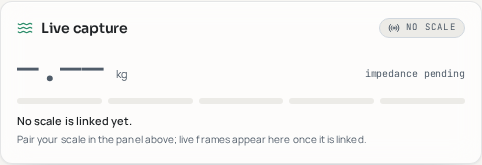
Actual app screenshot before pairing. Once real weight arrives, the dashes become your measured kg, the bar progresses, and the status changes. This is a UI reference, not a simulated successful reading.
Impedance pending? Weight can be valid without impedance. Body-fat, muscle and water numbers are estimates calculated by the app, not direct tissue measurements. Without impedance the app labels the anthropometric estimate; do not expect composition numbers to equal FeelFit's different formulas.
Step 5 — Compare the weight and correct safely
- Compare the app and physical scale for the same settled measurement and unit. The app shows kg; check whether the scale is displaying kg, lb or st before comparing.
- In Live capture, read scale sent … kg · correction … kg. Body Correct your weight also shows Scale sent and You are shown. A saved correction intentionally makes these differ.
- Aim for agreement at the scale display's own resolution. For example, a scale showing 80.1 kg and the app showing 80.10 kg agree. There is no universal acceptable accuracy variance established for your physical unit; consult its specification. The 80 g stability gate is not an allowed app-versus-scale mismatch. Repeat unexplained differences before trusting the result.
- If a previous correction is unwanted, use Remove correction, then take a new reading. Check floor, batteries and units; zero the scale using its manufacturer's procedure, reconnect, and repeat. Never change a scale factor merely to force a match.
- Only for a repeatable bias against a trustworthy reference: link the correct scale, open Correct your weight, enter Weight the app showed (kg) and Your real weight (kg), then Save correction. This saves an app-side offset for that scale, not a hardware recalibration. Take a fresh live reading and verify it again. An uncertain reference or changing discrepancy is a reason to investigate, not add an offset.
- If a large or inconsistent mismatch persists, use Frame map, Compare with your scale app, and Diagnostic export on Body to preserve the evidence. Do not assume the scale or decoder is correct simply because a plausible number appeared.
Step 6 — Verify saving, history and the Dashboard
- In Body Measurement history and Weigh-in history, locate the new weight with the expected time and device. A matching recent re-measurement can update the latest record instead of adding a duplicate.
- Reload Body and confirm the reading remains. This verifies saving in this browser; it does not prove account or phone-health synchronization. Avoid private browsing or clearing site data before exporting needed records.
- Return to Console → Live → Scale. Confirm last weigh-in, its kg and time match the saved measurement. A scale can sleep after weighing: an offline status with a saved time does not erase that reading.
- Reopen Body and check its latest Mass and Weigh-in trends. One measurement is not enough to establish a trend; missing trends or watch-dependent metrics are not proof of a scale failure. Use the 7d/30d/90d history views as you build real readings over time.
- Optional account check: sign in and explicitly enable Web console sync in Permissions only if you want it. Wait for Weigh-ins synced with your account, then use Measurement history Refresh to check account records. Saved on this device · account sync switched off in Permissions is intentional local-only operation; signing in alone does not enable sharing.
- Optional phone-health check: enable the relevant sharing permission and phone-health toggle only if wanted, keep the phone relay linked, and grant the phone Health service's permissions. Confirm the dated weight inside Samsung Health/Health Connect itself. A web save or an account-sync message does not verify this separate destination.
Step 7 — Troubleshoot and recover
| Problem | Recovery |
|---|---|
| Scale not detected | Check batteries, hard floor, Bluetooth and Nearby devices permission; force-stop FeelFit and other readers, wake scale, retry Pair scale or Show all. Phone relay scans automatically after permission is granted. |
| Bluetooth missing or blocked | Use a full HTTPS Chrome tab, not an in-app browser or editor frame. Turn Bluetooth on in settings. If unsupported, use Set up phone relay; a full tab cannot add Bluetooth support to an unsupported browser. |
| Wi-Fi or local-network failure | In Devices, run Run diagnostics. Keep relay running with notification, allow Chrome local-network access, use the same Wi-Fi for different devices, and avoid isolated guest networks. Try Open pairing on this phone if a cross-device connection is blocked. |
| Access code rejected | Open the current phone QR/link again; save the updated relay if using saved relays. Do not repeatedly try a rotated code. |
| No weight or delayed weight | Wake scale and keep Body visible, stand still, inspect last packet time in Bluetooth. A name or handshake is not a reading. Body Retry now, or phone Retry handshake, can restart a stalled exchange. |
| Incorrect value | Compare units, Scale sent versus You are shown, saved offset, zero and floor. Repeat Step 5; keep raw evidence if disagreement continues. |
| Sync fails | First check the local history entry. Confirm sign-in, internet, and chosen sharing permission. Saved on this device · account sync will retry means account delivery is pending. Health-service access requires its own permissions and destination check. Do not erase local readings to retry. |
| Link drops or remembered scale stays offline | Wake the scale; Dashboard Reconnect scale, Body Retry now, or Bluetooth Try the scale again now retries. If the stored grant no longer works, Body Forget scale then Pair scale. Forgetting requires selecting it again; protect needed records before clearing any site data. |
Guided success checklist
Tick only what you have verified on your own scale and phone. These confirmations reset when you leave this page.
0 of 7 checks confirmed by you
Optional sharing can stay off. If a check fails, return to that step before confirming it.
Complete User Manual · safety, watch setup and all consoles
Body-PulseX User Manual
Document ID: PO-UM-001 · Revision: 1.7 · Date: 2026-10-18 Change in this revision: added §7.0, a guided physical-scale connection and first-reading verification walkthrough, available in the in-app User Manual with screenshots and a user-confirmed checklist. Optional sharing remains opt-in. Change in 1.6: documented the Python scale bridge as a third reading path (§2.7); added the Bluetooth Status page (§7.5); rewrote §7 panel-by-panel for the Body page's exact on-screen labels; documented weigh-in storage, phone-Health import and the new phone-Health mirror (§7.3); troubleshooting matrix extended with the scale-hijack, greeting-stall and account-sync rows. Change in 1.5: §2.3 rewritten: one-tap connect, network gates, saved watches, token lifecycle. Changes in 1.4: registered in the documentation control sheet (PO-DX-000); terminology now defers to the glossary (PO-GL-001) so that a word means the same thing in the interface and in every document; connection troubleshooting cross-referenced to the operations runbooks (PO-OP-001 §5.2); the reasons behind the two-transport design and the labelled twin are recorded in ADR-0001 and ADR-0006. Changes in 1.3: chapter 19 (Vitality console) and chapter 20 (reporting a problem, and the maintenance view) added; glossary extended. Instrument: Body-PulseX Watch Intelligence Console Target hardware: a Wear OS smartwatch paired to an Android handset. Reference configuration for this build: model SM-L315F on a One UI handset. Companion documents: Glossary (PO-GL-001) · Model Reference (PO-MR-001) · Operations (PO-OP-001) · Code Documentation (PO-CD-001) · Version Audit Log (PO-AL-001)
Safety and intended use
Body-PulseX is a wellness and self-quantification instrument. It is not a medical device. It has no CE marking, no FDA clearance, and has not undergone clinical validation. Nothing it displays is a diagnosis.
Read this before using any number in this app:
- Do not use Body-PulseX to decide whether to seek or delay medical care. If you have chest pain, breathlessness, fainting, or a heart rate that frightens you, contact emergency services.
- Do not use the ECG Lab as a substitute for a clinical 12-lead ECG. A single-lead strip cannot exclude ischaemia, cannot localise infarction, and can miss intermittent arrhythmia entirely.
- Do not treat the SpO₂ readings as oximetry. Wrist optical SpO₂ is unverified against ISO 80601-2-61 and degrades with motion, cold hands, tattoos and poor contact.
- Do take every "urgent" flag to a clinician as an observation to discuss, with the exported PDF report as the artefact.
- Do remember that the app tells you when it is uncertain. A number shown with low confidence is telling you something real: the measurement conditions were poor.
Contraindications for interpretation: implanted pacemaker or ICD (paced rhythm invalidates the RR-interval statistics), atrial fibrillation already under treatment (HRV metrics lose their autonomic meaning), and pregnancy (all population reference bands in this app are non-pregnant adult cohorts).
1. What this instrument actually does
Most wearables show you a number. Body-PulseX shows you a number, its provenance, its uncertainty, and the arithmetic that produced it.
Three principles govern every screen:
- No fabricated data. If the watch stops sending, the app does not interpolate a plausible heart rate. It holds the last value, visibly decays its confidence, and marks the gap.
- Every number is traceable. Each index can be opened to reveal the formula, the inputs, the reference population, and the days that drove a trend.
- Uncertainty is first-class. Frames carry a confidence score; statistics are weighted by it; frames below 0.35 confidence are excluded, not quietly averaged in.
The measurement chain
  wrist sensor → transport → frame confidence → fusion → index → trend → evidence
      │             │              │              │        │        │        │
  optical/ECG    BLE or        timeliness ×    HR/HRV/   0–100   Theil–Sen  driving
   electrode      relay        freshness ×      resp     score    + Mann-    days +
                             provenance ×     synthesis           Kendall   jackknife
                               integrity                          + FDR
Every stage is inspectable in the app. This manual walks the chain in order.
2. Getting connected
2.1 Understanding your two transports
The Galaxy Watch 7 does not expose its health sensors to a browser. Samsung keeps the health GATT profile private to Samsung Health and the Galaxy Wearable bond. This is a platform decision, not a fault in the app, and no web application can bypass it.
You therefore have two paths:
| Path | What it is | When to use it | What you get |
|---|---|---|---|
| Native relay (recommended) | A small Android app on your phone receives sensor frames from a companion app on the watch and republishes them on your local network over an authenticated WebSocket | Always, on your S25 Ultra + Watch 7 | Full sensor set including IBI/RR and ECG chunks |
| Web Bluetooth (BLE) | The browser connects directly to any standard GATT services the watch grants | Third-party or developer-mode watches, chest straps, the Feelfit scale | Whatever standard services the peripheral publishes |
The app decides for you: on a detected One UI host it defaults to the relay and offers one-tap override to BLE.
2.2 Onboarding, step by step
Open the app. The onboarding flow runs once and covers four gates:
- Environment check. The app determines whether it is running in a top-level browser tab (required — Web Bluetooth is blocked inside iframes and most in-app browsers), whether a Bluetooth adapter is present, and whether the page is served over a secure origin.
- Transport choice. Relay or BLE, with the recommendation pre-selected for your hardware.
- Pairing. Either the relay wizard (§2.3) or the browser's device chooser (§2.4).
- Baseline scan. A short quiet capture that seeds your personal thresholds (§5).
Your answers are stored to your profile and appear afterwards in Setup history on the Console, with the permission state, signal quality and link type recorded for each attempt.
2.3 Native relay setup (/relay)
Install once.
- Install the two modules from the
native-relay/Android Studio project:wearon the Watch 7,phoneon the S25 Ultra. - On the watch, grant Body sensors and Physical activity. The collector never invents a missing sensor — if your watch does not expose skin temperature, that channel stays empty rather than being modelled.
- On the phone, start the relay service. It runs as a foreground service with a persistent notification; Android terminates background sockets, so this notification is load-bearing — do not dismiss the service.
- The phone shows a LAN address and a token. The relay is closed by default: without the token, connections are refused.
Connect — the normal path is one tap.
Press Find & connect. The app scans your Wi-Fi for the relay, links to it, and only asks for a token if the relay actually demands one. It confirms success only after a real sensor frame has arrived, not merely because a socket opened.
If you already have the line from the phone on your clipboard, Paste link is faster: paste the whole ws://192.168.x.x:8787/pulse?token=… string and the app splits the address from the token for you. Manual entry lives behind Enter manually for the rare case where you know the address and the scan cannot see it.
Before it scans, it checks four things and tells you plainly if one of them makes scanning pointless:
| Check | Why it matters | What you do |
|---|---|---|
| Online | Nothing can be found while the link is down | Turn Wi-Fi on — the scan restarts by itself |
| Radio | Mobile data cannot reach a phone on your LAN | Join the same Wi-Fi as the relay |
| Page origin | An HTTPS page cannot open a plain connection to a LAN address; only this device (127.0.0.1) can be scanned | Run the relay on this phone, or open the console over http |
| Local network permission | Android and the browser ask before letting a page find devices on your network | Tap Allow on the prompt |
If nothing answers, the panel offers retry, deep scan (probes all common home network ranges) and manual entry with port hints. The scan also retries itself, up to three times, whenever you come back online or switch networks.
Saved watches. Every verified link is saved automatically with its own address and its own token. Switching between watches — a second wearable, a relay at a different location — is one tap in the Saved watches panel, with no token re-entry and no re-discovery. You can rename or remove any entry; removing it also deletes its stored token.
Remembered network. The app also remembers which relay last streamed and a fingerprint of the network it worked on — the radio type and the relay's address range. When you return to that Wi-Fi it reconnects straight to that relay instead of sweeping the network, usually in well under a second. The line showing the remembered relay carries a Forget network action; the fingerprint contains no network name, no MAC address and nothing that identifies the network to anyone else.
Both devices must be on the same Wi-Fi network, and client isolation ("AP isolation" on guest networks) must be off.
Token lifecycle. The stored token shows its age. It is refreshed every time the relay accepts it and expires after 90 days of disuse, so an abandoned copy on a borrowed device stops working on its own. If the phone rotates the token, the app detects the refusal, marks the stored copy as rotated and offers Reset relay token, which wipes it and re-pairs — no reinstall. Rotate deliberately if you have ever shown the relay screen to someone else.
2.4 Web Bluetooth pairing
- Open the app in standalone Chrome or Edge — not inside another app's browser, not in an embedded preview frame. The app detects both cases and offers a one-tap "open in a full tab" action, plus an Android intent that launches Chrome directly.
- Turn the Bluetooth radio on at the OS level. Your phone-to-watch pairing is unaffected; the browser needs its own access. No web page on any platform can toggle the radio for you — that is a deliberate browser security boundary.
- Use Auto-continue when on: arm it, go to quick settings, switch Bluetooth on, and return. The app detects the radio within about a second (immediately on return if the tab was hidden), re-probes the environment, and resumes the connection without another tap.
- Press Pair. The browser shows its own device chooser; the app cannot pre-select for you (another deliberate security boundary).
2.5 The connection banner
The banner is always truthful about state:
| State | Meaning | Your action |
|---|---|---|
| Live | Real frames arriving from your watch | None |
| Connecting | Handshake in progress | Wait |
| Reconnecting (n/6) | Link dropped; exponential backoff up to 30 s | Usually none; the buffer is covering the gap |
| Simulated | No transport established after the grace window; a physics-based digital twin is driving the display | Everything is labelled simulated and nothing is written to your ledger |
| Offline | Deliberately disconnected | Press Connect |
The app remembers your last successful device and transport and re-initiates automatically when the radio returns.
2.6 Watch service availability
The service matrix distinguishes three things that look identical on other apps:
- Available — the channel is enumerated and delivering frames.
- Enumerated, silent — the service exists but has sent nothing for 20 s.
- Restricted — the device is a stock Galaxy Watch, and the channel is reserved by Samsung Health. The relay is the supported route.
A red cross next to Heart Rate on a stock watch is the app being honest, not broken.
2.7 A third path for the scale: the Python bridge
The Feelfit CS20G smart scale can be read three separate ways, and all three feed the same Body page history because they all publish into the same on-screen store:
| Path | Runs on | Best for |
|---|---|---|
| This computer's own Bluetooth | The desktop app or a standalone Chrome/Edge tab, using the browser's Web Bluetooth (§2.4) | A workstation or laptop with its own Bluetooth radio, sitting near the scale |
| The Android relay app | Your phone, over the same LAN socket the watch relay uses (§2.3) | Reading the scale from wherever your phone already is, with no laptop involved |
| The Python bridge | Any laptop, desktop or Raspberry Pi with Bluetooth and Python | A workstation with Bluetooth but no supported browser context, or a small always-on machine dedicated to the scale |
The bridge is a small program in the python-bridge/ folder — see
python-bridge/README.md for the full walkthrough. In outline:
- Install once:
pip install -r requirements.txtinside the folder's virtual environment. - Run
python main.py. It prints an address such asws://192.168.1.42:8787/pulse?token=…. - Paste that address into Devices → WiFi relay in this app.
- Close the FeelFit app completely, step on the scale barefoot, and stand still.
What success looks like: the Live capture panel on the Body page (§7.4) moves through
Introducing → Ready → Reading, and the settled weigh-in appears in Weigh-in history. To the
rest of the app, the bridge is indistinguishable from the phone relay — the Scale card, the
Frame map and the weigh-in history all work unchanged, because every path writes into the same
scaleLink store.
The bridge needs no phone and no Android tooling. Only one program may hold the scale's Bluetooth link at a time, so do not run the phone relay's scale reader and the Python bridge against the same scale at the same time, and always close the FeelFit app first.
3. Troubleshooting matrix
| Symptom | Most likely cause | Fix |
|---|---|---|
| "Web Bluetooth is unavailable in this browser" | In-app or embedded browser | Open in standalone Chrome/Edge (the app offers a one-tap intent) |
| "Running inside an iframe" | Preview frame without a Bluetooth permissions policy | Use the "open in a full tab" action |
| Adapter shows Off | OS radio off, or airplane mode | Quick settings → Bluetooth on; arm Auto-continue first and the app resumes itself |
| Pairing dialog lists no devices | Watch bonded exclusively to Galaxy Wearable | Expected — use the relay |
| Relay test times out | Different Wi-Fi network, AP isolation, or phone service killed | Same network; re-open the phone app; check the foreground notification |
| Relay returns 401/close | Missing or rotated token | Copy the current token from the phone app |
| Heart rate frozen | Frames stopped; value is held | Watch the confidence decay indicator; check contact and strap tightness |
| HR reads exactly your cadence | Motion artefact locked to arm swing | The consistency panel flags "cadence lock"; tighten the strap, move the watch above the wrist bone |
| SpO₂ blank | Cold hands, poor perfusion, loose strap | Warm hands, tighten one notch, stay still 30 s |
| Trends say "insufficient evidence" | Fewer than 5 days with data | Keep wearing it; the statement is a statistical fact, not a defect |
| Scale connects then instantly drops, or an "in use / busy / GATT" error appears | Another app — almost always FeelFit — is already holding the scale's single Bluetooth link, or the scale's radio has already gone back to sleep | Force-close the FeelFit app completely (swipe it away, not just leave it), step on the scale to wake it, then use Try the scale again now on Bluetooth Status (§7.5) or Re-pair on the Body page |
| Scale link stalls on "Introducing itself" / "handshaking" and never reaches a weigh-in | The scale keeps repeating its greeting frame (0x12) because the app's reply was never accepted, or arrived out of order — the firmware refuses to send a measurement to a central it does not believe is a real companion app | The app retries the handshake and then the whole connection automatically, waiting longer each time (about 0.8 s, 1.5 s, 3 s, 6 s, 10 s, then every 15 s) so a sleepy scale is not treated as a failure; step back on the platform so it keeps advertising, or tap Try the scale again now to skip the wait |
| Weigh-ins show "Saved on this device · sign in to sync" and never reach other devices | You are signed out, so there is no account to sync to — this is not an error | Sign in (/auth); enable Web console sync in Permissions if you want account uploads; signing in alone does not enable optional sharing |
| Weigh-ins show "Saved on this device · account sync will retry" | The sync request to your account failed once — usually a dropped network — while you were signed in | Nothing to do: the app retries automatically after 15 seconds, and every weigh-in is already safe in local storage in the meantime |
4. Reading the Intelligence Console (/)
4.1 The live vitals block
Every vital carries three pieces of metadata you should learn to read:
- Source —
measured(the sensor sent this),derived(computed from RR intervals), orheld(last known value, decaying). - Quality — 0–1, combining source authority, artifact rate and rejection history.
- Confidence — the frame's temporal confidence: how recent, how complete, how clean.
Heart rate specifically is protected by three guards: a plausibility window of 25–240 bpm, a slew limit of 30 bpm/s (faster than any real chronotropic response, so a bigger jump is a decode fault), and a median over the last three accepted values. When the source is RR-derived, it is the median of the last eight intervals — one ectopic beat cannot move the display.
4.2 The five flagship vitals engines
| Engine | What it measures | How to act on it |
|---|---|---|
| Cardio Coherence | How close your beat-to-beat rhythm is to baroreflex resonance (~6 breaths/min, 0.1 Hz), from a Lomb–Scargle spectrum of your NN intervals | Open the breath pacer; the score should climb within 90 s of paced breathing. This is a trainable skill, not a fixed trait |
| Silent Arrhythmia Sentinel | RR irregularity (CVNN, pNN50, Poincaré SD1/SD2) plus beat-scatter against your learned limit, multiplied by data reliability | A sustained breach triggers a 30-second confirmation capture. Take a repeat measurement seated and still before drawing any conclusion |
| Metabolic Drift Radar | One-sided elevation of skin temperature and resting HR against your own baseline, in SD units | Two consecutive elevated nights is the classic pre-symptomatic illness signature, typically 12–36 h ahead of symptoms. Treat it as a reason to rest, not as a diagnosis |
| Autonomic Battery | ln-RMSSD position between your personal floor and target, debited by stress and sleep debt | Low battery = poor day for hard training or hard decisions. The log transform matters: RMSSD is log-normal, so raw millisecond differences mislead |
| Hypoxia Watchdog | Desaturation burden against your floor, plus an ODI-3% event rate over the session | Repeated nightly clusters are the AASM-style signal worth showing a clinician. Daytime dips are usually contact artefacts |
Each card can be expanded into an explain panel that decomposes the score into its terms, showing which input moved it and by how much.
4.3 Consistency checks
The consistency panel runs nine cross-validations on every window — HR against RR-derived rate, beat integrity, contact state, cadence harmonics, the HRV–HR coupling ceiling, the cardiorespiratory ratio, the age-predicted envelope, provenance, and perfusion. The tolerance band is max(5 bpm, 10 % of reference), taken from ANSI/CTA-2065.
When two signals disagree, the app says so instead of picking a winner. A "halved beats" or "doubled beats" verdict means the optical sensor is counting wrong, and the displayed rate should not be trusted until contact improves.
4.4 Signal quality
Five channels — lock, perfusion, motion, contact, respiration — each graded from in-range fraction and jitter, then combined. Degradation requires three consecutive ticks below 60 and recovery requires 75, with a 90-second cooldown. That hysteresis exists to stop alarm chatter; it also means the quality bar lags reality by a few seconds by design.
5. Calibration: making the numbers yours
Population averages are a poor description of any individual. Body-PulseX therefore learns you, in two distinct exercises that people often confuse.
5.1 Baseline calibration (who you are)
What it does. Learns your resting HR, HRV, SpO₂, respiration, skin temperature and beat scatter, and converts them into the thresholds every engine uses.
Protocol. Five sessions, ideally on different days and at similar times. For each: sit still and quiet for the capture, no caffeine within two hours, no exercise within one hour, strap one notch tighter than usual, one finger-width above the wrist bone.
How it learns. Sessions are weighted by recency (0.78 per session back) and by their own quality score, then blended with a population prior using an empirical-Bayes shrinkage update. Early on you are mostly prior; by session five you are mostly you. This is why a single strange session cannot wreck your thresholds.
Derived thresholds. Resting HR = your mean; HRV floor = mean − 1.2 SD; HRV target = mean; SpO₂ floor = mean − 2 SD (capped at 97 %); fever delta = 1.6 SD (minimum 0.30 °C); scatter limit = mean + 2 SD.
Recalibration. The app prompts when your data drifts (a drift score ≥60, or any channel ≥2.5 SD from baseline), when the baseline is older than 14 days, or when you have fewer than five sessions. You can snooze for two days.
5.2 Metrology calibration (how accurate the instrument is)
This is the Calibration Lab (/calibration), and it is a different question: not what is normal for me, but how far is this sensor from a reference.
Protocol per module. Take simultaneous paired readings — the app's value and a reference value — across a span of the measurement range. Spanning matters: ten pairs all at 60 bpm tell you about offset but nothing about slope. The HR module wants at least 25 bpm of span.
The mathematics. Pairs are fitted with Deming regression, not ordinary least squares, because the reference device also has error; OLS in that situation systematically flattens the slope (regression dilution) and would understate your instrument's true gain error. The variance ratio λ is set per module (HR 2, HRV 3, SpO₂ 1).
Agreement is then reported Bland–Altman style: bias (mean difference), SD of differences, A_rms (√mean of squared differences, the ISO 80601-2-61 statistic), MAE, MAPE, and the repeatability coefficient 1.96·SD_diff.
Verdicts. In tolerance (A_rms within the module tolerance and bias within its limit); correctable (out of tolerance raw, but within it after applying the fitted correction — the app will offer to apply it); out of tolerance (the sensor disagrees in a way a linear correction cannot fix; suspect fit, contact or hardware).
| Module | Tolerance | Bias limit | Standard basis |
|---|---|---|---|
| Heart rate | 5 bpm or 10 % | 3 bpm | ANSI/CTA-2065 |
| HRV (RMSSD) | 8 ms or 15 % | 5 ms | ESC/NASPE 1996 |
| SpO₂ | 3.5 % A_rms | 2 % | ISO 80601-2-61 |
| Respiration | 2 breaths/min | — | — |
| Skin temperature | 0.3 °C | — | ISO 80601-2-56 |
| Steps | 20 steps or 10 % | — | — |
| Weight | 0.3 kg | — | OIML R76 |
| Body fat | 3.5 % | — | Kyle 2004 / ESPEN |
Recommended interval: 60 days per module, or after any change of strap, watch position, or firmware.
5.3 Heart-rate validation mode (a 60-second reference check)
The quickest honest check of your instrument: count your own pulse.
- Open HR validation mode and sit still for 30–60 seconds.
- Palpate the radial or carotid pulse and tap once per beat, or enter a total count.
- The app compares its own stream against your count.
It reports bias, MAPE, the fraction within tolerance, Lin's concordance correlation coefficient, the repeatability coefficient, and drift per 30 days. It also reports the resolution of your own method — counting for 30 s has a floor of 2 bpm — so you can see the reference's error, not just the device's.
Session gates: at least 30 s elapsed, ≥5 device readings, ≥10 counted beats, device SD ≤8 bpm, mean quality ≥0.5. A session failing these is discarded rather than recorded as evidence. Pass criteria: |bias| within the module limit, MAPE ≤10 %, ≥90 % of pairs within tolerance, CCC ≥0.9.
6. ECG Lab (/ecg)
6.1 Recording a usable strip
Sit, forearm supported, elbow resting. Hold the opposite finger firmly on the crown for the full recording — light contact is the single biggest cause of unreadable strips. Do not talk, do not clench, keep the arm still. Thirty seconds minimum; the rhythm classifier requires ≥30 s before it will call anything.
6.2 What the app does with it
- Conditioning — baseline wander removed by a 0.5 Hz high-pass; mains interference measured at both 50 and 60 Hz and notched at whichever dominates; 5–15 Hz band-pass for beat detection.
- Beat detection — the Pan–Tompkins algorithm (1985): derivative, squaring, 150 ms integration, adaptive dual thresholds, 200 ms refractory period, T-wave discrimination and searchback for missed beats.
- Quality scoring — five PhysioNet/CinC 2011 indices (kurtosis, baseline power, flatline fraction, high-frequency fraction, saturation) combined into diagnostic / readable / poor.
- Delineation — an ensemble median beat is built (complexes after an irregular RR are excluded), then QRS onset/offset by steepest-slope walk-back and T-end by the tangent method.
- Intervals — PR, QRS, QT, and QTc by four formulas. The headline uses Fridericia below 60 or above 100 bpm and Bazett in between, because Bazett over-corrects at tachycardia and under-corrects at bradycardia — a detail most consumer apps ignore.
6.3 Interpreting the output
| Reading | Watch | Urgent | Note |
|---|---|---|---|
| QTc | >460 ms | >500 ms | Repeat before reacting; QTc is sensitive to T-end placement |
| PR | >200 ms | — | First-degree AV block pattern |
| QRS | >120 ms | — | Wide-complex pattern |
| Ectopics | ≥3 in the strip | — | Common and often benign |
| Rhythm | irregular, unclassified | AF suspected | Requires ≥30 s and quality ≥ readable |
AF screening combines RR irregularity (RMSSD/meanRR), sample entropy, pNN50 and P-wave absence, scaled down by strip quality and halved when the irregularity looks ectopic rather than fibrillatory. A positive result is a screening result: it means "record another strip and show a clinician", nothing more.
6.4 Pulse deficit — the check no single sensor can do
The ECG measures the electrical beat; the optical sensor measures the mechanical pulse that reaches the wrist. Comparing them detects beats that fire electrically but eject too little blood to be felt — the classic sign in AF and frequent ectopy.
Deficit = HR_ECG − HR_PPG. Above 5 % is minor; above 10 % is reported as a genuine deficit. This requires both sensors simultaneously and is one of the few things this app can do that a chest strap or a finger oximeter alone cannot.
7. Body: Mass-Flux Twin (/body)
Connect a Feelfit-class BLE scale (SIG Weight Scale 0x181D / Body Composition 0x181B, plus the vendor frame format). Weigh yourself under standard conditions: morning, post-void, pre-meal, bare feet, dry skin. Bio-impedance assumes euhydration — a post-exercise or post-meal reading violates the model's assumptions and will move your body fat by percentage points for reasons that have nothing to do with fat.
7.1 Composition
With impedance, fat-free mass comes from the Kyle (2001) equation on the resistance index h²/Z, and total body water from Kushner & Schoeller (1986). Without impedance, the app falls back to Deurenberg (1991) anthropometry and the Wang (1999) hydration constant of 0.732. Results are bounded physiologically (FFM between 35 % and 97 % of mass; TBW between 67 % and 79 % of FFM) so an impedance glitch cannot produce an impossible body.
FFMI and FMI are reported against the Schutz (2002) bands, and resting metabolic rate uses Katch–McArdle when lean mass is measured and Mifflin–St Jeor when it is estimated.
7.2 The five Mass-Flux indices
The novelty here: wrist physiology is re-expressed per unit of metabolically active tissue rather than per person. A 60 bpm heart rate means something different in a 45 kg-lean body than in a 70 kg-lean one.
| Index | Question it answers |
|---|---|
| Lean-normalised cardiac transport | How many beats per minute is your heart spending per kilogram of lean mass? Reference band ≈0.85–1.15 |
| Fluid-compartment shift | Is your water-to-lean ratio drifting from the 0.732 hydration constant? |
| Mass-adjusted autonomic reserve | Is your HRV what it should be for your age and your lean mass, not just your age? |
| Metabolic flux coverage | Does intake cover allometric demand, scaled by Kleiber's (weight/lean)^0.25? |
| Tissue partition trajectory | Are you adding lean and losing fat, or the reverse? (slope difference over time) |
Composite bands: resilient ≥70, compensating ≥45, strained below. Historical values are recomputed causally — a day's score never uses information from later days, so your history does not silently rewrite itself.
7.3 Every panel on the page, in order
The Body page renders the same set of panels regardless of which of the three reading paths (§2.7) fed the last weigh-in — this is deliberate: ISO 9241-110:2020's conformity-with-user- expectations principle says the same information should look the same wherever it appears.
| Panel (on-screen heading) | What it shows | Decision it supports |
|---|---|---|
| Feelfit scale link | The scale's connection phase (idle / connecting / handshake / listening / measuring / re-arming / offline), a Pair scale / Re-pair button, Show all (removes the Bluetooth device filter), and a manual weight/impedance entry box | Whether to step on again, force-close the vendor app, or fall back to typing in a reading |
| Also import weigh-ins from the phone Health app (toggle) | Whether readings the FeelFit app saved to the phone's Health store are pulled into this history too | Keep two histories separate, or merge them into one (§7.4) |
| Also send weigh-ins to the phone Health app (toggle) | Whether this app's own weigh-ins are pushed out to the phone's Health store, and whether the phone relay is currently linked to do it | Whether other Health-app-reading tools on the phone should also see these numbers |
| Live capture | The unsettled mass streaming in real time, a five-segment progress bar of agreeing frames, and the impedance reading once available | Whether to keep standing still — nothing is saved until the gate below fills |
| Frame map | The raw scale packet, byte by byte, with each byte's role (mass, impedance, checksum, reserved) and the ÷10 / ÷100 / ÷1000 candidate masses so you can see which one matches the scale's own display | Diagnosing a divisor, endianness or unit disagreement against the vendor app (§7.6) |
| Anthropometry | Height, age and sex inputs | Correcting the three inputs every composition formula depends on |
| Body composition | Mass, fat-free mass, body-fat %, body water, FFMI and estimated RMR for the latest reading, plus a fat-free-mass trend sparkline | Reading today's composition result and whether it is impedance-derived or an anthropometric estimate |
| Mass-flux readiness | The composite Mass-Flux score, its band, and the five indices from §7.2 in expandable detail | Deciding whether wrist physiology looks resilient, compensating or strained relative to your own lean mass |
| Weigh-in trends | Charted history of mass and composition over time | Spotting drift across weeks, not just the latest reading |
| Calculated tissue | Fat, muscle, body water and bone mineral in kg and % of body mass | Comparing tissue-level detail against the scale vendor's own screen, row for row |
| Calculation trace (collapsed by default) | Every input the composition calculation received and every value it produced | Checking the arithmetic by hand or against a vendor app |
| Compare with your scale app | Ours vs. the FeelFit app's own numbers, an automatic agreement verdict, and — when they disagree — the specific decoding fault (wrong divisor, swapped bytes, pounds vs kilograms, missing impedance) with the fix, plus a manual entry box for typing in the other app's numbers | Deciding whether a discrepancy against FeelFit is a real difference in method or a fixable decoding bug |
| Scale factor lock | The solved firmware mass divisor once enough paired readings exist | Locking in the byte layout for this specific scale unit so future frames decode correctly |
| Weigh-in history | Every capture with its signal quality | Reviewing or auditing individual weigh-ins |
7.4 Weigh-in storage, sync and the phone Health app
Every weigh-in — however it was captured — is written to this history in the same order:
- Local first. The reading always lands in this browser's or app's local storage immediately, whether or not you are signed in and whether or not you have a network connection. A line under the Feelfit scale link panel states this plainly: "Saved on this device · sign in to sync" when signed out, "Syncing weigh-ins with your account…" while a sync is in flight, and "Weigh-ins synced with your account" once it lands.
- Private account sync, when signed in and explicitly enabled. Enable Web console sync in Permissions to upload your local weigh-ins to your own account and merges anything already stored there, so the same history appears on your phone, the web app and the desktop app. A collision on the same reading keeps the locally-captured copy, because it may carry richer radio diagnostics (the raw packet, for example) that a synced copy does not.
- Importing from the phone Health app (toggle: Also import weigh-ins from the phone Health app, controlled separately in Permissions). The Android relay reads back weigh-ins that other apps — including the FeelFit app itself — wrote to the phone's Health store, and folds them into this same history and your account. Turn it off if you deliberately want to keep a comparison between FeelFit's own numbers and this app's numbers separate; the Compare with your scale app panel (§7.3) still works either way, reading the phone's Health store directly.
- Sending this app's weigh-ins to the phone Health app (toggle: Also send weigh-ins to the
phone Health app, controlled separately in Permissions). This is the reverse direction: each new weigh-in captured
here is written out to the phone's Health store as well, so any other Health-app-reading tool
on the phone sees it too. The write happens on the phone — this computer only asks the phone
relay to do it over the same LAN link that carries vitals — so the phone relay must be
linked for it to work; the line under the toggle says so explicitly ("Start the relay on
your phone and keep it linked so readings can be sent" versus "Phone relay connected — each
new weigh-in is written there too"). When it is off, weigh-ins stay in this app and your
account only.
- What is sent: mass, and body resistance (impedance) when the scale measured it.
- What is withheld: fat, muscle, water and bone are never sent, because the scale never measured them — this app calculates them from mass and impedance (§7.1), and sending a calculated figure into another app's store as if it were measured would misrepresent its provenance. This mirrors the design rule the Python bridge documents for its own output: "the bridge deliberately sends only what the hardware actually measured."
7.5 Bluetooth Status (/bluetooth)
A dedicated diagnostics page — separate from the Body page because the question "is the radio even working" is worth answering on its own, without composition maths in the way. It reads the same underlying stores as the Body page and the dashboard's Scale card, so nothing here can disagree with what those pages show; it only adds detail. This separation follows Nielsen's "visibility of system status" heuristic: a stalled link should be diagnosable without hunting through an unrelated results screen.
The page has four panels:
| Panel | Rows | Reading a fault |
|---|---|---|
| Radio | Reported Bluetooth adapter state (on / off / unsupported / checking), and whether a scale grant is remembered | Off: turn Bluetooth on in the OS, not just in this app. Unsupported: this browser cannot report Bluetooth state at all — use the Android relay or the Python bridge instead (§2.7) |
| Smart scale | Device name, status phase, last packet time, last weigh-in time, packets decoded (and per minute), undecodable packets, signal strength (dBm), and how many notify channels are open, plus a Try the scale again now button | A device name but no recent packet means the platform has gone back to sleep — step on it. A rising "undecodable packets" count with no weigh-ins suggests a divisor or firmware mismatch — check the Frame map on the Body page (§7.3) |
| Wearable & relay | Last wearable device and transport, when it last streamed, the phone relay's address and when it was last verified, with a link to the Devices page | Confirms whether the watch side of the relay is healthy, independently of the scale |
| Messages from the scale | Any current error, a specific warning when another app looks like it is holding the link, a warning when this browser cannot listen for the scale's broadcasts, a scrolling log of the last several link events, and the last raw packet in hex | The log is the ground truth for a support report — copy it rather than describing the symptom from memory |
If the scale panel shows a device name with a phase stuck on "Introducing itself" for more than a few seconds, see the greeting-stall row in the troubleshooting matrix (§3): the fix is nearly always to stay on the platform and let the automatic retry ladder run, or to force-close the FeelFit app first.
8. Chrono-Phenotype Calendar (/calendar)
8.1 The daily fingerprint
Each day is reduced to a 20-locus signature across five clusters — cardiac, autonomic, oxygen, metabolic, recovery. Each locus is z-scored against your median and MAD (blended with population values until you have eight days), then rendered as a letter from an eight-symbol alphabet. The result is a compact glyph you can compare across days at a glance.
Cluster scores weight the loci by polarity (some are good high, some good low, some are neutral where deviation in either direction is the signal). The composite weights clusters: autonomic 1.3, oxygen 1.2, cardiac 1.0, recovery 1.0, metabolic 0.8.
Verdicts: thriving ≥64, steady ≥48, strained ≥34, depleted below — with an override to anomalous when today's signature is genuinely unlike your recent self (similarity <0.25).
8.2 Pattern detection
Seven detectors, each a smooth logistic on a composite of z-scores rather than a hard threshold, so confidence rises gradually instead of flipping:
| Pattern | Signature |
|---|---|
| Inflammatory triad | resting HR up + HRV down + temperature up |
| Overreaching | HRV down + sleep debt up + stress up |
| Hypoxic | SpO₂ down + nadir down + respiration up |
| Fluid deficit | hydration down with resting HR drifting up |
| Supercompensation | HRV up + resting HR down + debt cleared |
| Underfuel | intake down + activity up + lean mass slipping |
| Phenotype shift | today is unlike your recent self across the whole 20-locus vector |
8.3 Timestamps and circadian context
Every logged measurement carries a timestamp and a circadian phase label derived from local time, so a 06:00 HRV reading is never silently compared against a 22:00 one. Coverage is reported as the longest contiguous run of covered hours in the day — 18 scattered hours and 18 contiguous hours are not the same evidence.
9. Body Insights (/insights)
9.1 Trends done properly
Trends use Theil–Sen slopes (median of pairwise slopes, ~29 % breakdown point) rather than least squares, so one anomalous day cannot manufacture a trend. Significance is the non-parametric Mann–Kendall test with tie correction — it assumes no distributional shape, which matters because almost nothing in physiology is Gaussian.
Evidence labels map directly to p-values: strong <0.01, moderate <0.05, weak <0.2, none otherwise or with fewer than five days.
Multiplicity control. With 20 loci tested repeatedly, uncorrected testing would produce a "significant" result roughly daily by chance alone. Alerts therefore apply Benjamini–Hochberg FDR control at α = 0.05 across all simultaneously tested loci. This is why the app reports fewer, better trends than apps that test each metric in isolation.
Change points are detected with the Pettitt test — useful for "when did this actually change?" rather than "is it drifting?".
9.2 Peer norms
Percentiles come from named cohorts, not invented curves: NHANES for resting HR, the FRIEND registry for VO₂max, Nunan's meta-analysis for HRV, the Sleep Heart Health Study for overnight SpO₂ nadir, Tudor-Locke for steps, Schutz for FFMI. Each band shows its source in the app. A percentile is a comparison, not a target — a 30th-percentile resting HR in an endurance athlete is unremarkable.
9.3 Coupling map
Cross-correlation between metrics at lags of −3 to +3 days, retained only at |r| ≥0.5 with at least eight paired days. It answers questions like "does my sleep debt lead my HRV by a day?" The app deliberately calls these couplings, never causes.
10. Evidence dossiers, sharing and export
10.1 The dossier
Any KPI or locus can be opened into a dossier containing:
- Fusion inputs — every sensor and derived value that fed the number.
- Trend statistics — Theil–Sen slope, Mann–Kendall τ and p, change point if any.
- Confidence ledger — coverage × quality × support, with the grade (high / moderate / low / insufficient) and the reason.
- Driving days — a leave-one-out jackknife showing exactly which days move the slope, and a concentration figure. If one day carries most of the trend, the app says the trend is fragile rather than significant.
10.2 Sharing safely
Share links are redacted, time-limited and view-capped. The recipient sees one dossier — the statistics and the conclusion — never your measurement history, and never your identity. Technically: a 32-byte random token is generated, only its SHA-256 hash is stored, the page is excluded from search indexing, and you can revoke any link instantly. Treat the link itself as the credential; anyone holding it can view it until it expires, is exhausted, or is revoked.
10.3 PDF export
Two exports exist: a session report (current vitals, engine scores, connection metadata, quality) and a dossier report (trend statistics, confidence ledger, driving days). Both are branded, self-contained and suitable to hand to a clinician. Both state on the page that the instrument is not a medical device.
11. Alerts
Three sensitivity presets tune every alert at once:
| Preset | Margin | Sustain | Cooldown | Use when |
|---|---|---|---|---|
| Low | 1.35 | 45 s | 15 min | You only want to hear about clear events |
| Balanced | 1.10 | 25 s | 8 min | Default |
| High | 0.90 | 12 s | 4 min | You are actively investigating something |
Alert families: arrhythmia signals (scatter and HRV floor breach), hypoxia risk (deficit, dip count, respiratory load), autonomic trend (HRV gap, HR creep, stress). Evidence alerts are separate and statistical: confidence collapse, confidence drop, an FDR-surviving trend shift, a Pettitt level shift, and a fragility advisory when a single day dominates.
Every alert carries an actionable summary: what changed, by how much, over what window, with what confidence.
12. Data, privacy and account
- Baselines, buffers and preferences live in your browser's local storage. Profile, setup history and share links live in your account.
- The offline ring buffer holds up to 15 minutes of frames (256–8192 depending on rate) to cover dropouts, and replays them on reconnect with restored frames marked and down-weighted to 0.85 confidence.
- You can export your calibrated baseline as JSON and import it on a new device, so switching phones does not cost you five calibration sessions.
- Error telemetry scrubs console breadcrumbs, query strings and share tokens; no health value leaves the app through error reporting.
- Payments run through Paddle, PayFast or Ozow. Every webhook is signature-verified and idempotency-ledgered before entitlement changes.
13. AEGIS Sentinel and THE SANCTUM (/sentinel)
13.1 What the Sentinel does
The Sentinel continuously scores the observations it can see — respiration rate, SpO2, skin temperature, pulse, and anything you enter manually — using the NEWS2 early-warning parameter set, and places you in one of five tiers:
| Tier | Meaning | What the app does |
|---|---|---|
| Sanctuary | Nothing of concern | Quiet |
| Watch | One parameter drifting | Notes it, keeps scoring |
| Elevate | Multiple parameters or a rising trajectory | Suggests a re-measurement and an action plan |
| Urgent | Aggregate score in the escalation band | Arms the emergency roster, offers handover PDF |
| Emergency | Severe single-parameter or aggregate breach | Puts the local emergency number and one-tap dispatch on screen |
Important. A wrist sensor cannot measure consciousness, and it measures respiration indirectly. If a parameter is missing, the Sentinel says the score is partial rather than assuming that parameter is normal. Never treat a "Sanctuary" verdict as reassurance if you feel unwell.
13.2 The call tree
The call-tree viewer shows, as a diagram, exactly who would be contacted, on which channel, and in what order, for any tier you select — including hypothetical scenarios you have not reached. Use it to check your roster before you need it.
13.3 Emergency roster and dispatch
Add contacts in priority order, each with a phone number, optional email, and the tiers that arm them. Numbers are normalised to international format; destinations are masked on screen. When a tier arms dispatch, the app prepares the message and hands it to your phone's SMS, WhatsApp or email app — you always see and confirm the message before it leaves. Every attempt (sent, opened, cancelled, blocked, failed) is written to a local dispatch log you can review or clear.
13.4 Responder handover PDF
One tap produces a handover sheet: current NEWS2 with the per-parameter breakdown, trend sparklines, your notes and medications, and a QR code a responder can scan to open the redacted dossier. Past handovers are archived on the device so you can re-issue one.
13.5 THE SANCTUM
A resonance and breathing module: adaptive tones generated live (nothing is streamed), with the frequency and envelope responding to your current autonomic state, plus a practice log so you can see whether a technique actually moves your HRV. This is a wellbeing practice, not a treatment, and it is never presented as one.
14. Preferences that follow the device
14.1 Per-watch transport override
The transport override (Auto / Force BLE / Force relay) is saved per watch, not globally. Each remembered device gets its own setting; devices you have never pinned inherit a default. The override panel shows which device the setting applies to, flags when a value is inherited, and offers a one-tap Use default to unpin. Swapping watches re-scopes the preference immediately — no reload needed.
14.2 Storage health
Everything local shares one browser storage quota. The app tiers its data: safety-critical items (emergency roster, escalation policy, baseline, consent) are protected, and if the device runs out of room the app sheds regenerable telemetry — ECG strips, the outage buffer, the oldest ledger entries — to make room. If a save is genuinely refused, you get an explicit "out of room" notice; the app never pretends a save worked. Export your baseline JSON and any needed PDFs before clearing browser data.
14.3 Panel failures
Each panel is independently sandboxed. If one engine hits bad data it collapses to a single card naming the panel with a retry button; the rest of the console and your live stream keep running. Repeated failure of the same panel is worth reporting.
14.4 Shutting down
The logout/shutdown button is a coordinated teardown: it stops timers and audio, closes the transport, flushes pending saves, then signs you out. Use it instead of just closing the tab if you want to be certain nothing is left streaming.
15. Consent, cookies and legal
On first run you choose what non-essential telemetry is allowed. Until you decide, nothing optional loads — the gate is real, not cosmetic, and you can withdraw consent at any time from the same control, effective in the same session. The /legal page carries the intended-use statement, the not-a-medical-device disclosure, data handling and retention, and support contact details.
16. Maintenance schedule
| Task | Frequency | Why |
|---|---|---|
| Baseline calibration session | 5 sessions initially, then when prompted | Thresholds drift with fitness, season and sleep patterns |
| HR validation (manual pulse count) | Monthly | Cheapest detector of a degrading optical path |
| Metrology calibration per module | 60 days, or after any strap/position/firmware change | Bias accumulates silently |
| Baseline JSON export | After each recalibration | Cheap insurance |
| Relay token rotation | If ever exposed | The token is the only thing standing between your LAN and your vitals stream |
| Review driving days on any acted-upon trend | Before acting | A trend carried by one day is not a trend |
19. Vitality console (/vitality)
Four cards, each answering a different question about training and recovery. All four are built from your own history — your measured resting heart rate, your calibrated baseline, your logged days — and every card tells you which of its inputs were measured and which were assumed.
| Card | The question | What to do with it |
|---|---|---|
| PAI-X | Have I done enough cardio this week to matter? | Aim for a rolling total of 100. The card shows points expiring in the next 24 h and the minutes at a stated heart-rate band that would clear the shortfall today |
| Bio-Charge | How much have I got left? | A 0–100 budget that drains with cardiac, stress and low-oxygen load and refills when you are genuinely quiet. It also states hours to empty or to 80 at the current rate |
| Launch Window | Am I ready, and when today? | A score, a concrete intensity ceiling in bpm, and the clock hours when you have historically performed best |
| Adaptive Dose | What should today's session actually be? | Minutes, a target bpm band, and the reason. Never exceeds the Launch Window ceiling |
Three things worth knowing:
- Effort while under-recovered is worth less. PAI-X discounts a day whose HRV sits below your own baseline. That is intentional: those minutes cost you more and buy you less.
- Taking the watch off does not create recovery. Unobserved hours are credited at resting rate only, never at the overnight rate.
- Thin evidence is stated, not hidden. Each card needs a minimum number of logged days and will say "not enough evidence yet" instead of showing a confident guess. Complete the calibration sessions in chapter 5 to move them onto your own numbers.
These are wellness models, not clinical ones, and they assume you are not on a rate-controlling medication such as a beta-blocker — such medication flattens heart-rate reserve and invalidates every number on this page.
20. Reporting a problem
Send a bug report. From any screen, open the report dialog and describe what happened. The app attaches the technical context needed to reproduce it: the page you were on, the transport in use, your device, recent connection log lines, your consent settings and the build version. It does not attach your vitals, your contacts or any share link.
If the report cannot be sent — no network, or the service is briefly rate-limited — it is not lost. It is parked on this device and retried automatically over the next few hours, including after you close and reopen the app. You can also copy or download the report and send it yourself.
The maintenance view. Support may ask you to open a hidden diagnostics page (/debug/sentry, or press Ctrl/Cmd + Alt + S). It is not part of the product and is safe to look at: it shows whether this build's version matches the one crash reports are recorded against, whether the reporting service is reachable, and what any queued reports are waiting for. Nothing on it transmits health data.
17. Glossary
A_rms — root-mean-square difference against a reference; the accuracy statistic used by ISO 80601-2-61. Bland–Altman — a method-comparison analysis reporting bias and limits of agreement rather than correlation. Breakdown point — the fraction of contaminated data an estimator tolerates before it becomes arbitrary. Theil–Sen: ~29 %. Least squares: 0 %. CCC (Lin's concordance) — agreement measure penalising both scatter and systematic offset; correlation alone cannot detect a constant bias. Deming regression — line fitting where both variables carry error; required for method comparison. FDR (Benjamini–Hochberg) — controls the expected proportion of false discoveries among many simultaneous tests. Frame confidence — timeliness × freshness × provenance × integrity, in [0.05, 1]; below 0.35 the frame is excluded. LTTB — Largest-Triangle-Three-Buckets: chart downsampling that keeps peaks and troughs visible instead of averaging them away. NEWS2 — National Early Warning Score 2, the aggregate physiological early-warning score the Sentinel uses as its methodological source. Storage tier — critical / standard / bulk classification that decides which local data is shed first when the device runs out of room. Transport scope — the identity of the watch a transport override applies to; overrides are saved per watch. Kish effective sample size — how many equally weighted samples your weighted sample is really worth. Lomb–Scargle — spectral estimation for irregularly sampled series; correct for RR intervals, unlike an FFT on interpolated data. Malik filter — rejects an RR interval differing by more than 20 % from its predecessor. Mann–Kendall — non-parametric test for monotone trend. ODI-3% — oxygen desaturation index: 3 %-or-greater desaturation events per hour. Pettitt test — non-parametric change-point detection. pNN50 — percentage of successive NN intervals differing by more than 50 ms. Poincaré SD1/SD2 — short- and long-term variability from the RR scatter plot. RMSSD — root mean square of successive NN differences; the standard short-term vagal index. Shrinkage (empirical Bayes) — pulling a small-sample personal estimate toward a population prior in proportion to how little data supports it. Theil–Sen — robust slope estimator, the median of all pairwise slopes. TRIMP — training impulse; exercise load weighted exponentially by heart-rate reserve.
Added in revision 1.3
| Term | Meaning |
|---|---|
| Heart-rate reserve (%HRR) | Where a heart rate sits between your resting and maximal rate — the honest way to compare efforts between people |
| PAI | Personal Activity Intelligence: a rolling 7-day cardio score from the HUNT Fitness Study, where 100 is the point of diminishing returns |
| ACWR | Acute:chronic workload ratio — how fast your training load is changing relative to what you are adapted to. Above 1.5 is where injury risk rises |
| TRIMP | Training impulse: duration weighted by intensity, so an interval hour scores far above an easy hour |
| Launch window | The clock hours when your own history says you perform best |
18. Support and escalation
For a clinical question, export the relevant dossier or session PDF and take it to a clinician; the report contains the measurement conditions, the confidence ledger and the standards each number is based on, which is what makes it discussable.
For an instrument question — a channel reported restricted, a link that will not hold, a calibration that will not converge — start with §3, then the Relay checklist, then the Calibration Lab's own diagnostics. Each of those screens reports live probe results rather than remembered flags, so what they show is the current truth about your setup.